
En ITMADRID Business School CURSO DE JIRA ESSENTIALS ONLINE (16h en total. lunes y miércoles de 19h a 21h) INSCRIBETE AQUÍ
Read More
MrAddon estará en el AUG Barcelona
El AUG que celebramos este 9 de Marzo de 2017, es el primero del año. La finalidad es compartir experiencias reales, entre usuarios del ecosistema de aplicaciones Atlassian. Cada empresa, en base a sus necesidades usa las soluciones Atlassian de forma diferente, con enfoques originales, curiosos, etc, que es seguro interesante compartir con el resto…
Read More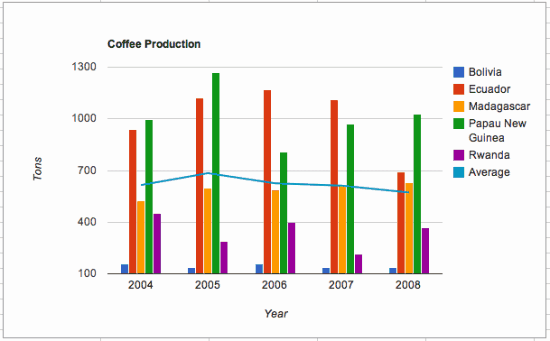
How to publish a Google Sheets Chart in a Confluence page
Very easy, see this steps In the Google Sheets charts, click on “Publish Chart” –> “Publish” Copy the URL Then, in your Confluence page, insert a “New Macro” –> “HTML” Insert an with “src” attribute and fill it with the URL See this example:
Read MoreMastering JIRA Course by MrAddon in the Knowtech Barcelona offices
We are happy to announce the new COURSE / TRAINING “MASTERING JIRA” in the Knowtech offices in Barcelona ( inside the Glories Comercial Center). See the summary and levels of the course. Different modules for different professional roles. The modules are not consecutive. Learn JIRA Basics in only 2 hours!! Special or employees of IT…
Read More
Confluence Permission Quiz by META-inf team
Very useful to remember the permissions in Confluence that are really very hard to understand “logically”. Thanks META-Inf team! Learn with gamification technics always is funny! And created with the services of my colleagues of TypeForm from Barcelona! Really Nice two times! DO THE QUIZ!
Read More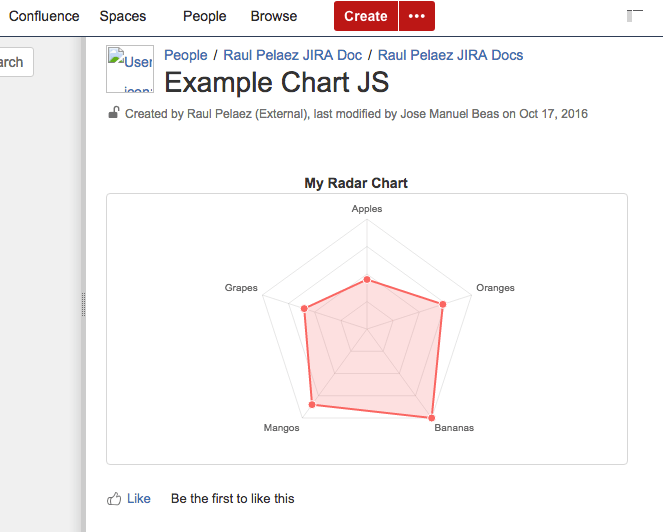
Radar Charts in Confluence FREE
Original POST from Lewe.com and adapted for Confluence 5.10 by MrAddon and Jose Manuel Beas (super Agile coach) Instructions: First go to the Conflunce Configuration/Administration and create two User Macros In the first User Macro: chartjs, put this code (with “No Macro body“): In the first User Macro: radarchart, put this code (with “No Macro body“):…
Read MoreHow to create a new JIRA Scripted Custom Field obtaining LDAP attributes
Very simple! Download the plugin Kepler Custom Fields Create a SIL Script Custom Field In the custom field configuration set a new script like this: return ldapUserRecord(“attribute”, “”, “”, “”, “user@example.com”, “user”); Remember to configure the LDAP connection Go to “Cog icon” –> Addons –> KEPLER –> LDAP Configuration URL = ldap://localhost:389 BIND USER =…
Read MoreNew JIRA Cloud development environment FREE!
Info extracted from: “https://developer.atlassian.com/blog/2016/04/cloud-ecosystem-dev-env/?utm_source=newsletter&utm_medium=email&utm_campaign=developer-newsletter_may-2016” Cloud development instances “In order to make the cloud development experience better, we have designed a new environment for you that includes free development instances exclusively for add-on developers. When you sign up for a developer instance, you will get: JIRA Core: 5 users free JIRA Software: 5 users free Confluence:…
Read MoreObtaining Confluence metrics & SQL tricks
MySQL query to get the last login of all members of the confluence-users group SELECT distinct u.lower_user_name, l.successdate FROM cwd_user u LEFT JOIN logininfo l ON u.user_name = l.username JOIN cwd_membership m ON u.id = m.child_user_id JOIN cwd_group g ON m.parent_id = g.id JOIN spacepermissions sp ON g.group_name = sp.permgroupname WHERE permtype=’USECONFLUENCE’ order by u.lower_user_name; …
Read More
Confluence trick: Put a button to create a Blog Entry
Very easy!… Insert the HTML Macro Inside the Macro put this code:
Read MoreTrick to navigate Prev/Next with Anchors in Confluence
If you want to navigate Prev/Next anchor with your Chrome between different anchors in the same page of Confluence, there is a trick to do that with a Javacript Macro in the Confluence Page. Insert into the page this piece of code, that’s all!
Read MoreHow to change the creator of a page in Confluence 5.2 or above
For Confluence 5.2 and above To change the creator of a specific page Run this SQL query against your database, replacing these values: <lowerusername> with the username of the new creator in lower case ‘the title of the page’ with the page title (case sensitive) <thespacekey> with the spacekey in uppercase update content set creator…
Read More


 www.MrAddon.com ®: Jira & Confluence Administration Support Blog