
Copy this code in the description of a custom field (in the Field Configuration linked to the project)
Read MoreChanging Custom Fields Types in JIRA
Certain fields can be safely upgraded, such as Version and Select lists to their multiple values counterpart. You can change the “customfieldtypekey” in the “customfield” table to whatever you need it to be. The table below lists the keys for commonly changed fields. Custom Field Type Type Key Single Version com.atlassian.jira.plugin.system.customfieldtypes:version Multi Version com.atlassian.jira.plugin.system.customfieldtypes:multiversion Single…
Read MoreHow to create a new Scripted Custom Field in a JIRA dashboard
Download the plugin Kepler Custom Fields Create a SIL Script Custom Field In the custom field configuration set a new script like this: Insert the custom field in the dashboard That’s all!
Read More
Multi-column WIP Limits with JIRA Agile in JIRA
NOTE: In this moment I have created a new PLUGIN TO DO THIS. At mobile.de many teams use Kanban to organise their project work. JIRA together with theJIRA Agile plugin (formerly known as Greenhopper) allows you to configure and maintain an electronic Kanban board and even define WIP limits per column. However, if you’d like to have multi-column WIP…
Read More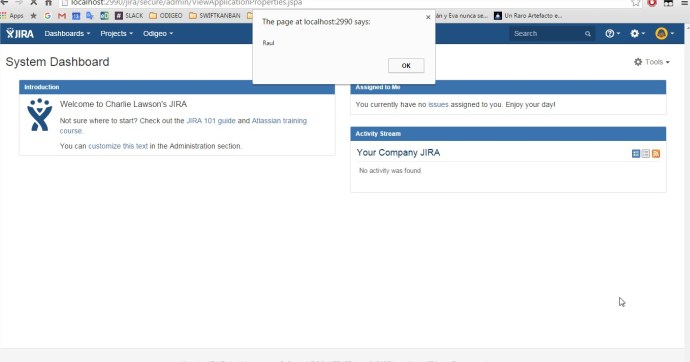
Create a new plugin / add-on in JIRA to set custom CSS and Javascript / JS in all pages
Creating our first JIRA plugin “Hello World”: enter in C:\atlastutorial atlas-create-jira-plugin Enter 1 for JIRA 5 groupId: com.atlassian.tutorial artifactId: helloworld version: 1.0-SNAPSHOT package: com.atlassian.tutorial.helloworld Press Y to continue Browse to and open the atlastutorial/helloworld/src/main/resources/atlassian-plugin.xml file Modify helloworld.js and add inside a piece of code like this: “alert(“Hola!”)” Modify the tag <context> to active the Javascript…
Read More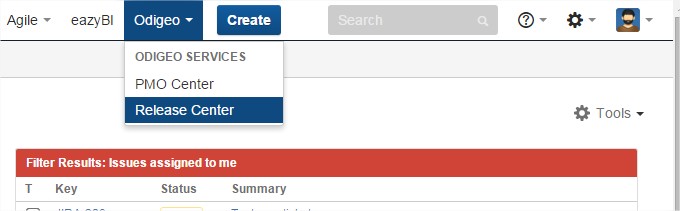
Create a new Add-on or Plugin in JIRA to show more options in the Main Menu /General Menu
Creating our first JIRA plugin “Hello World”: enter in C:\atlastutorial atlas-create-jira-plugin Enter 1 for JIRA 5 groupId: com.atlassian.tutorial artifactId: helloworld version: 1.0-SNAPSHOT package: com.atlassian.tutorial.helloworld Press Y to continue Add a module to the plugin: enter in C:\atlastutorial atlas-create-jira-plugin-module Select the 30 Web Section item by entering 30. Answer each question as follows: Question Value Description…
Read MoreNew Listener to set a Custom Field when someone move a ticket to a target project
Database Custom Fields with Kepler Plugin. Show a list of issues of one JIRA project in a Custom Field
1.- Install the plugin: https://marketplace.atlassian.com/plugins/com.keplerrominfo.jira.plugins.keplercf 2.- Create a Custom Field of the new Type “Database Custom Field” 3.- Go to your apache-tomcat/conf/context.xml and add the Datasource (first you need to install the Database JAR Driver if it’s different database Oracle, MySQL,… for example in apache-tomcat/lib/mysql-connector-java-5.1.17.jar 4.- Restart Tomcat 5.- Go as Admin to –> JIRA –> Add-ons…
Read MorePostFunction to set Date-Time custom field with Groovy Script Runner
New JQL Function Custom to retrive issues with inactive user in assignee “HasInactiveAssignee” or in reporter “HasInactiveReporter” (Jira 6 and 7)
On {JIRA_GOME}/scripts/ create this folders: For example: ../jira_home/scripts/com/onresolve/jira/groovy/jql Then add the groovy file with the new JQLFunction, exmaple: HasInactiveAssignee.groovy The code: Then Go to Addons –> ScriptRunner –> Script JQL Functions –> and then press “Scan” Syntax: issueFunction in hasInactiveAssignee(‘project = XXX’) That’s all!
Read MoreHow to add new custom JQL Function with ScriptRunner
On {JIRA_GOME}/scripts/ create this folders: For example: ../jira_home/scripts/com/onresolve/jira/groovy/jql Then add the groovy file with the new JQLFunction, exmaple: ABC.groovy Then Go to Addons –> ScriptRunner –> Script JQL Functions –> and then press “Scan” That’s all!
Read MoreHow to create a new Listener with Groovy ScriptRunner
Create a new file named Example.groovy Copy the file in the JIRA server, path {JIRA_HOME}/scripts/{package}/Example.groovy NOTE: if the script contains “package example.Example” {package} must be “example” in this case Then define the Custom Listener in JIRA > Add-ons > ScriptRunner Listeners In Note: put general Information, for example “MyFirstListener Example” In Project Key: put all the…
Read More


 www.MrAddon.com ®: Jira & Confluence Administration Support Blog