Copy this code in the description of a custom field (in the Field Configuration linked to the project) Result:
Read More

www.MrAddon.com ®: Jira & Confluence Administration Support Blog
jira confluence admin administration support script scriptrunner groovy mraddon barcelona plugin custom development it technology barcelonatech development
Copy this code in the description of a custom field (in the Field Configuration linked to the project) Result:
Read More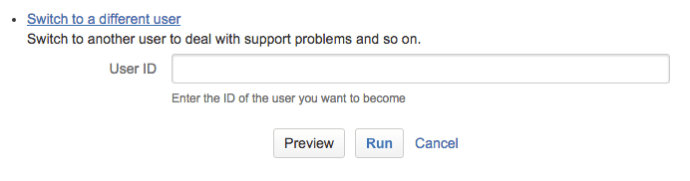
First go to “Add-ons” Then go to “SCRIPT-RUNNER > Built-in Scripts” Then click on “Switch to a different user” And put the username you want to are 🙂
Read MoreIf the option System > Advanced > WebHooks is hidden… Probably you lost the add-ons. Only you need is install as a plugin in JIRA & Confluence. Yo can download for JIRA 6 & Confluence in the Word attached (inside there is a ZIP with the .JAR’s) jira-confluence-webhooks-plugin Webhooks documentation: https://confluence.atlassian.com/display/JIRA063/Managing+Webhooks More documentation: https://developer.atlassian.com/static/connect/docs/latest/modules/common/webhook.html
Read MoreLaunch the Integrity checker from the Administration view “Check Workflow Integrity” ( in order to avoid timeout on the web transaction, is good option connect to the original IP:PORT of the JIRA for example: http://127.0.0.1:8080) If when the issue is moved an error is raised like “duplicate key entry…“, the best option is launch this instruction in…
Read MoreGo to JIRA > Add-ons > Script Runner > Script Console Copy the script contents, replace “PUT_KEY_OF_ISSUE” and press Run This code correct problems with issues that don’t shows the status correct in views, etc.
Read MoreOur recommended books:
 |
 |
 |
 |
 |
 www.MrAddon.com ®: Jira & Confluence Administration Support Blog