New Easy Kanban Roadmap for Jira Datacenter with Microsoft Project export new option!

Easy Kanban Roadmap (formerly Kanban Gantt) simplifies project management with a straightforward Gantt visualization for JIRA Agile Kanban board issues. Since december of 2023, exist a Paid commercial version of the App with those new features:  The Gantt extract all the issues of the configured Issue filter of the Kanban board (that means, closed issues…

Read More
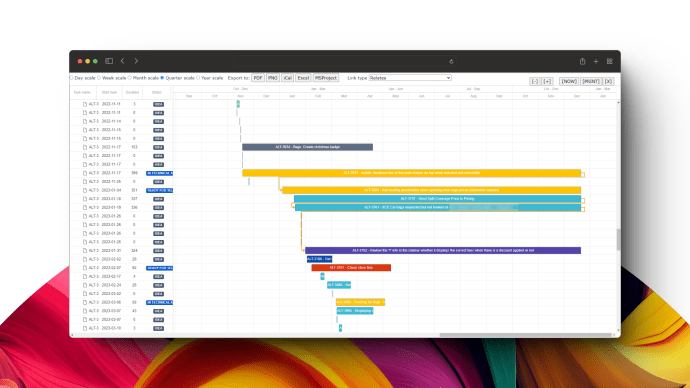
🔄Coordinate your team directly from your board in Jira Datacenter with Easy Kanban Roadmap

Easy Kanban Roadmap (formerly Kanban Gantt) simplifies project management with a straightforward Gantt visualization for JIRA Agile Kanban board issues. Since december of 2023, exist a Paid commercial version of the App with those new features: 👉 The Gantt extract all the issues of the configured Issue filter of the Kanban board (that means, closed issues…

Read More
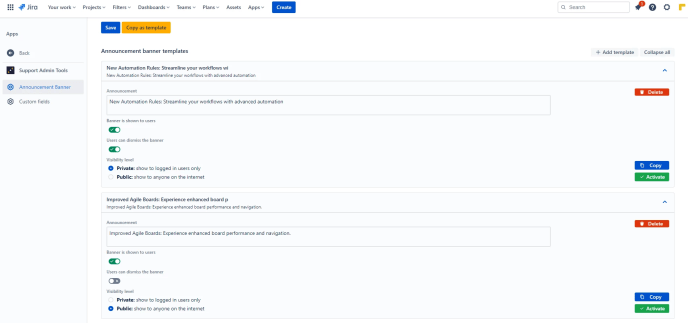
Boost Communication and Productivity with These Useful Banner Templates for Jira Cloud

Effective communication is the cornerstone of successful project management, and Jira Cloud offers a powerful platform for teams to collaborate seamlessly. To enhance communication and productivity, “Support Admin Tools & Announcement Banner for Jira Cloud” by TecnoFor provides the ability to reuse announcement banners through templates. In this blog post, we’ll explore different useful banner…

Read More

Working with Panels in the Jira Issue View

In this post we want to show how to change some parts of the web panels of the Jira Issue View context. We can start changing the default global settings of Jira (in the Advanced section). We can change the jira.table.cols.subtasks variable to add more fields to the web panel, also with the variable jira.view.issue.links.sort.order we…

Read More

How to extract an Excel report from Tempo Timesheets using an URL

It’s very easy! Just use an URL like this: https://yourserver.yourdomain/plugins/servlet/tempo-getWorklog/?dateFrom=2019-01-01&dateTo=2019-01-31&format=excel&diffOnly=false&tempoApiToken=my-token (here the documentation of the Servlet) remember to set the dateFrom, dateTo params The ApiToken you can find it in the Apps section of Jira, on Tempo “Access Control” option  

Read More