Very easy, try to enter in the “Groovy Script Console” and execute this code. source extracted from here
Read More

www.MrAddon.com ®: Jira & Confluence Administration Support Blog
jira confluence admin administration support script scriptrunner groovy mraddon barcelona plugin custom development it technology barcelonatech development
Very easy, try to enter in the “Groovy Script Console” and execute this code. source extracted from here
Read More
New example of Groovy Service for JIRA to Flag and comment issues not updated in X days in status X… very easy!
Read More
This is the example code for a PostFunction to transition a linked Issue in status X to another status of the workflow. Very easy with Adaptavist Scriptrunner. See this code.
Read More
Very easy with Scriptrunner plugin! Go to “Cog Icon–>Add-ons–>SCRIPTRUNNER–>Script Fragments” Add a Hide option and insert these parameters. NOTE 1: Remember, the option must return “false” to hide the option. NOTE 2: replace “KAN” for the Key of the project you want to apply
Read MoreThis example show a button in the “More” option of the issue tickets called “Approve this issue“. This button call a Scriptrunner REST custom Endpoint and returns a “flag” Object to be shown as alert in the ticket. First go to “Add-ons-> Scriptrunner –> REST Endpoints” and add this script: Then save the REST Endpoint.…
Read More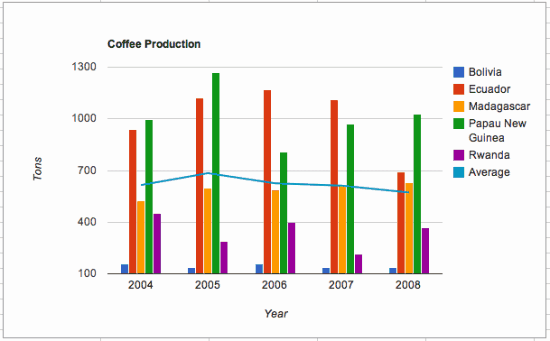
Very easy, see this steps In the Google Sheets charts, click on “Publish Chart” –> “Publish” Copy the URL Then, in your Confluence page, insert a “New Macro” –> “HTML” Insert an with “src” attribute and fill it with the URL See this example:
Read MoreWe are happy to announce the new COURSE / TRAINING “MASTERING JIRA” in the Knowtech offices in Barcelona ( inside the Glories Comercial Center). See the summary and levels of the course. Different modules for different professional roles. The modules are not consecutive. Learn JIRA Basics in only 2 hours!! Special or employees of IT…
Read More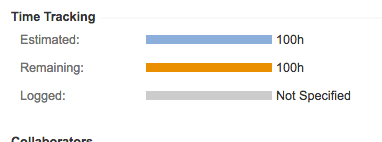
Very easy! Put in the fields of the screen the field “Time Tracking” Once filled the Estimated time in diverse tickets you can easy search for this issues with JQL: Use the special field “timeestimate” to do the queries Then you can activate the columns “Original Estimate” and “Remaining Estimate”
Read MoreIt’s very simple! Just write with your favorite text editor a XML file, like this example: Now upload the XML file to the internet (like github), and get the RAW URL of the file. Now, go to ADD GADGET in your DASHBOARD, then MANAGE GADGETS and install the URL of the XML file. That’s all!…
Read More
Hi people, I know.. I know, this is not for JIRA 🙂 …. but, I have made some plans to introduce BlockChain in JIRA 😀 … and the first step is.. How we can “watch” and “trace” BlockChain currencies in all moment? … and one way is doing an app for my Android cell hehe…
Read MoreVery easy! First, go to the Project Administration of your target project to remove the option. Then, go to the Field Configuration ( all of them if there are more than one). Edit the “description” of the “description” field ( or some customfield that is visible in the project screens). Add this “javascript” code in…
Read MoreVery easy! Create the required TimeStamps custom fields to fill with a Listener or a PostFunction with Groovy Scriptrunner with a CODE like this Then create a Groovy Scripted Field in JIRA to calculate the SLA (ANS in spanish). You can follow this instructions to create the HTML field Put a code like THIS: That’s…
Read MoreOur recommended books:
 |
 |
 |
 |
 |
 www.MrAddon.com ®: Jira & Confluence Administration Support Blog