

This post is the continuation of:
- How to call methods of Ethereum Smart-Contracts from WordPress with MetaMask, Web3 and Javascript
- How to call methods of Ethereum Smart-Contracts from WordPress with MetaMask, Web3 and Javascript (PART II)
- How to store information in Ethereum with Smart-Contracts
In this post we want to see/obtain or get the info stored in the Smart-Contract using Web3 (with MetaMask Google Chrome plugin or Brave browser) and Javascript.
We can use this HTML+Javascript example code to read the info from this Token Contract: 0xf035755df96ad968a7ad52c968dbe86d52927f5b from the Rinkeby Test-net.
First add the script libraries:
http://rawgit.com/ethereum/web3.js/0.16.0/dist/web3.min.js
https://cdn.jsdelivr.net/npm/ethjs@0.3.0/dist/ethjs.min.js
Then add a new script code, like the below:
window.addEventListener('load', function() {
            // Check if Web3 has been injected by the browser:
            if (typeof web3 !== 'undefined') {
                // You have a web3 browser! Continue below!
                startApp(web3);
            } else {
                // Warn the user that they need to get a web3 browser
                // Or install MetaMask, maybe with a nice graphic.
            }
        });

        const contract_address = '0xf035755df96ad968a7ad52c968dbe86d52927f5b';
        var eth = null;
        function startApp(web3) {
            //alert("entro");
            document.getElementById("etherlog").innerHTML = "Enterng web3<br>";
            eth = new Eth(web3.currentProvider);
            //alert("llego");
            web3.eth.getStorageAt(contract_address, 0, function(error, result){
            if(!error) {
                console.log(web3.toAscii(result))
                document.getElementById("etherlog").innerHTML+= "Owner: " + result + "<br>" ;
            } else
                console.error(error);
            });
            web3.eth.getStorageAt(contract_address, 2, function(error, result){
            if(!error) {
                console.log(web3.toAscii(result))
                document.getElementById("etherlog").innerHTML+= "Token: " + web3.toAscii(result) + "<br>" ;
            } else
                console.error(error);
            });
            web3.eth.getStorageAt(contract_address, 1, function(error, result){
            if(!error) {
                console.log(web3.toAscii(result))
                document.getElementById("etherlog").innerHTML+= "Token Name: " + web3.toAscii(result) + "<br>" ;
            } else
                console.error(error);
            });
            web3.eth.getStorageAt(contract_address, 3, function(error, result){
            if(!error) {
                console.log(web3.toAscii(result))
                document.getElementById("etherlog").innerHTML+= "Decimals: " + web3.toDecimal(result)+ "<br>" ;
            } else
                console.error(error);
            });
            web3.eth.getStorageAt(contract_address, 7, function(error, result){
            if(!error) {
                console.log(web3.toAscii(result))
                document.getElementById("etherlog").innerHTML+= "Price Buy: " + web3.toDecimal(result)+ "<br>" ;
            } else
                console.error(error);
            });
            web3.eth.getStorageAt(contract_address, 8, function(error, result){
            if(!error) {
                console.log(web3.toAscii(result))
                document.getElementById("etherlog").innerHTML+= "Price Sell: " + web3.toDecimal(result)+ "<br>" ;
            } else
                console.error(error);
            });
            web3.eth.getStorageAt(contract_address, 4, function(error, result){
            if(!error) {
                console.log(web3.toAscii(result))
                document.getElementById("etherlog").innerHTML+= "Total Tokens: " + web3.toDecimal(result)+ "<br>" ;
            } else
                console.error(error);
            });


        }
And finally add the HTML code to see the results
<div id="etherlog">LOG</div>
<a href="https://rinkeby.etherscan.io/address/0xf035755df96ad968a7ad52c968dbe86d52927f5b#code" target="new">Token Contract: 0xf035755df96ad968a7ad52c968dbe86d52927f5b</a>
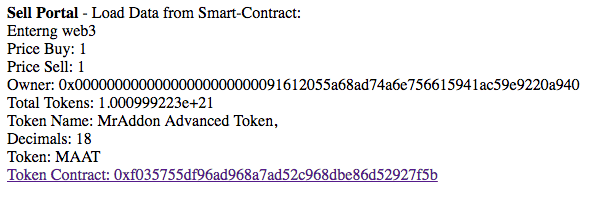
If we save this HTML+Javascript code in a file and we push to the internet, we will see the results/params/variables of the contract:
Very easy!
Related info: How to read Ethereum contract storage
By MrAddon


 www.MrAddon.com ®: Jira & Confluence Administration Support Blog
2 replies on “How to read storage data from an Ethereum Smart-Contract using Web3 and MetaMask”