
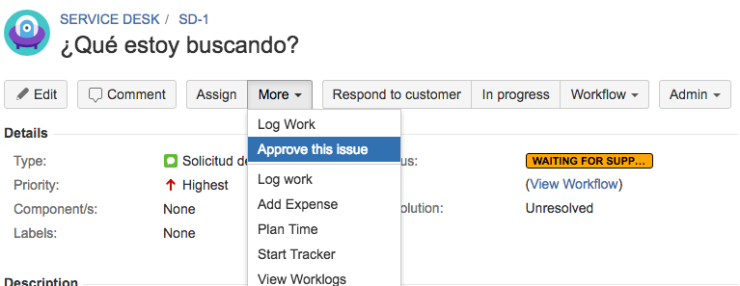
This example show a button in the “More” option of the issue tickets called “Approve this issue“. This button call a Scriptrunner REST custom Endpoint and returns a “flag” Object to be shown as alert in the ticket.
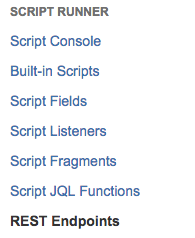
First go to “Add-ons-> Scriptrunner –> REST Endpoints” and add this script:
import com.onresolve.scriptrunner.runner.rest.common.CustomEndpointDelegate
import groovy.json.JsonOutput
import groovy.transform.BaseScript

import javax.ws.rs.core.MultivaluedMap
import javax.ws.rs.core.Response

@BaseScript CustomEndpointDelegate delegate

approve(httpMethod: "GET") { MultivaluedMap queryParams ->

// the details of getting and modifying the current issue are ommitted for brevity
def issueId = queryParams.getFirst("issueId") as String // use the issueId to retrieve this issue

def flag = [
type : 'success',
title: "Issue approved",
close: 'auto',
body : "This issue "+issueId+" has been approved for release"
]

Response.ok(JsonOutput.toJson(flag)).build()
}
Then save the REST Endpoint.
Once saved, you must create a new WebFragment.
Then go to “Add-ons –>Scriptrunner –> Script Fragments” and select the Built-in template “Custom WebItem”
Fill the form with these values:
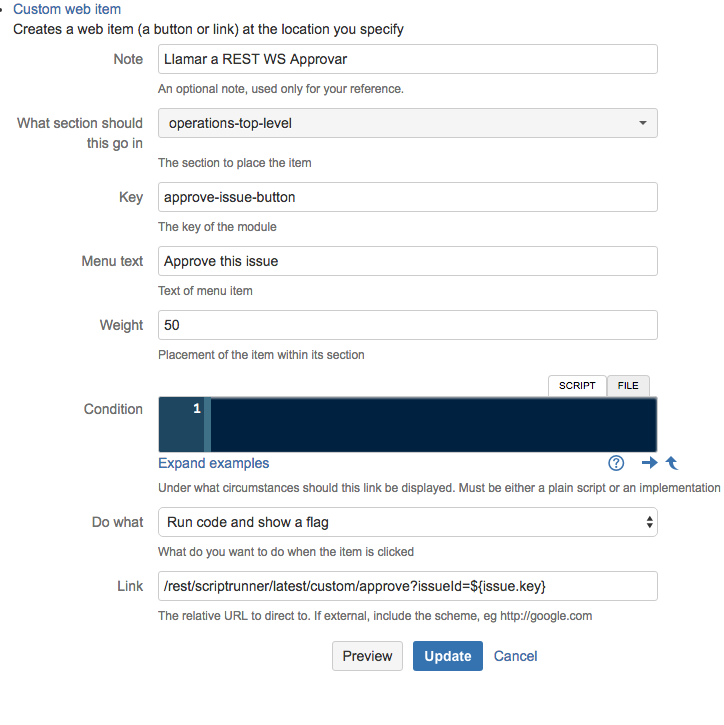
Once saved, you can try the Option in some ticket and see the results:
BTW you can try the REST Endpoint invoking this URL (you must be logged in JIRA through the browser to see the response):
https://{jira_url}/rest/scriptrunner/latest/custom/approve?issueId=XXXX

NOTE: See here the list of possible locations for your WebItem


 www.MrAddon.com ®: Jira & Confluence Administration Support Blog
Unfortunately this menu button does not appear (scriptrunner 5.0.1 + JIRA 7.3.6)
LikeLiked by 1 person
Hi Jan, yesterday I was trying this example with the last version of JIRA & Scriptrunner and works fine for me (and my class). Regards!
LikeLike