
As many of you know, to get the “required” & “reported” hours of a Tempo Timesheet Team (in JIRA), don’t exists a REST Web Service interface to get these values… But, exist and “old” “hack”-trick to do this using the mystical “CURL” (in this example case calling cull in the bash shell, running the process inside…
Read MoreCalculate the SLA with Scripted Field in ScriptRunner for JIRA
Very easy! Create the required TimeStamps custom fields to fill with a Listener or a PostFunction with Groovy Scriptrunner with a CODE like this Then create a Groovy Scripted Field in JIRA to calculate the SLA (ANS in spanish). You can follow this instructions to create the HTML field Put a code like THIS: That’s…
Read MoreHow to restrict resolution options in JIRA
Very easy! Edit the Workflow transition to “CLOSED“ Click on “Properties“ Add this pair “key – value” jira.field.resolution.include = id_resolution_1, id_resolution_1023, .. That’s all!
Read More
Confluence trick: Put a button to create a Blog Entry
Very easy!… Insert the HTML Macro Inside the Macro put this code:
Read More
New plugin for JIRA: New Status Colors FREE
New colors for two kind of status [red] for “Cancel” or “Cancelled”, “Suspend” or “Suspended”, “Reject” or “Rejected” and [orange] for “Wait” or “Waiting”, “Hold”, “On Hold”, “Pause” or “Paused”. Only you need to create the new status using this names.(containing one of this words,i.e. for word “Waiting”: “Waiting for Customer”, “On Waiting”, …). This…
Read MoreJIRA JQL trick: Filter issues based on transition state execution date in JIRA
Very easy, see the JQL example: Project = “JIRA” AND Status CHANGED TO “In Progress” DURING (“2015/08/01″,”2015/10/05”) Other Syntax: This JQL shows all issues which have been in “Status A” for more than 14 days project=XXX and status changed to “Status A” before startofday(-14) and status = “Status A” This JQL shows all issues which…
Read More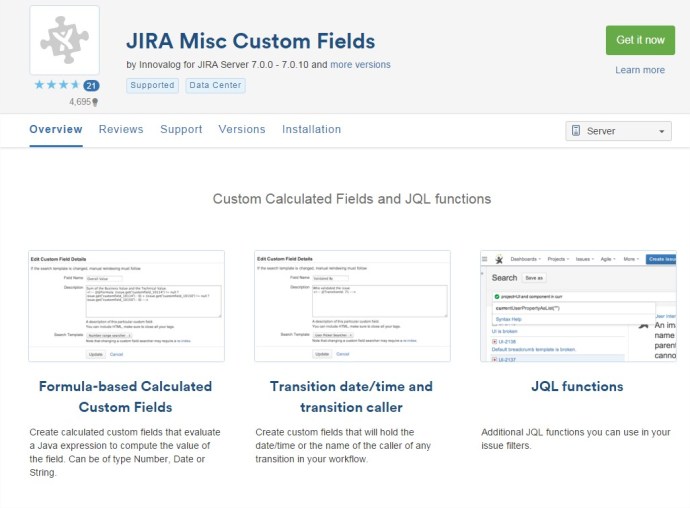
How to create a Custom Field calculated in JIRA with JIRA MISC addon
To create a new custom field calculated, we can use the addon of JIRA “JIRA Misc Custom Fields”. The plugin can be downloaded from: https://marketplace.atlassian.com/plugins/com.innovalog.jmcf.jira-misc-custom-fields/server/overview Example of Custom Field that sum two different Custom Fields: 1.- Go to create new Custom Field. Select Type “Calculated Number Field” 2.- In the “description” of the new customfield set…
Read MoreHow to put additional info in the JIRA login page
It’s very easy! 1.- Go to System –> System Dashboard 2.- Add the gadget “Introduction to JIRA“ 3.- Configure the gadget in System –> General Configuration It works in JIRA 6 & 7 (Optional action) 1.- Go to set the Announcement Banner –> Set to Public 2.- Paste a code like this: See more in:…
Read MoreNew example of Groovy Service for JIRA to ARCHIVE big tasks
How many of you knows, when an issue grows and become a big issue ( for diverse reasons, more comments, more worklogged hous in Tempo, …), then the access to this ticket cost a lot of CPU. In this post I try to make a little example of a Custom Groovy Scriptrunner Service to archive…
Read MoreNew example of JQL Custom function
Here is a function with two input parameters to show, as result, a list of issues that it’s worklogged hours sum more than the input parameter two. It’s an easy function to know how create new JQL custom methods.
Read More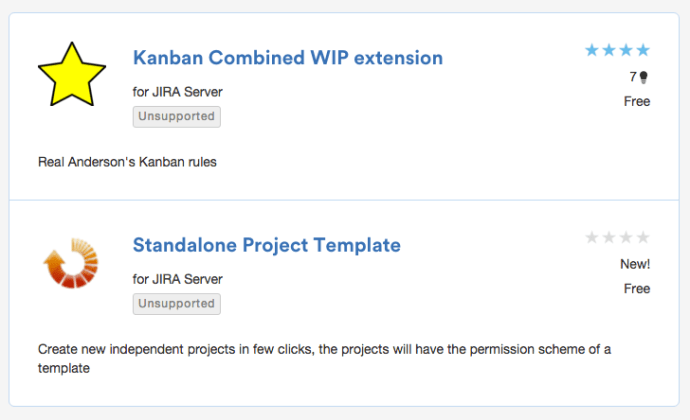
Start this year with two FREE awesome plugins for your JIRA 6 or 7!
KANBAN COMBINED WIP EXTENSION: Welcome to new colorful JIRA Agile boards We have changed the way Kanban boards are displayed in JIRA to add some color and make our lifes happier with our new plugin. It is possible now to combine columns in boards To do this, when you are configuring your board, you need…
Read MoreHow to Show/Hide Custom Field depend on another custom Field Value in JIRA
Copy this code in the description of a custom field (in the Field Configuration linked to the project)
Read More


 www.MrAddon.com ®: Jira & Confluence Administration Support Blog