
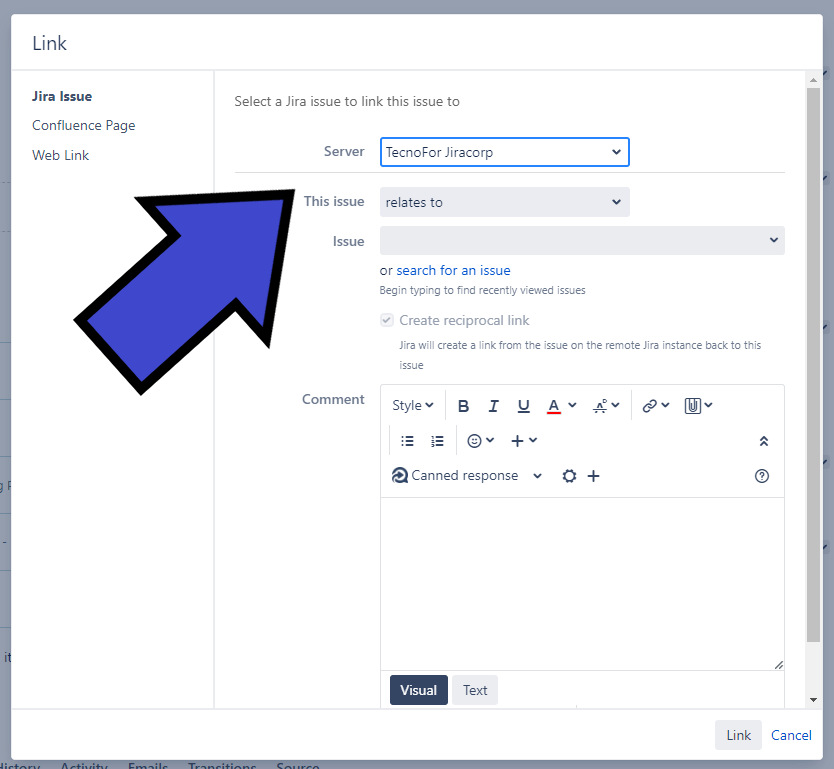
In the dynamic landscape of enterprise collaboration, Jira Federation emerges as a game-changer, offering enhanced functionality and streamlined collaboration. Let’s explore the key features that make Jira Federation the future of managing multiple instances.
Why Jira Federation Matters:
- Effortless Scaling: Manage growth seamlessly as Jira instances expand across teams and departments. 📈
- Mergers Made Easy: Simplify collaboration in the face of mergers and acquisitions, effortlessly handling multiple Jira servers. 🔄
- Autonomous Agility: Balance autonomy with cross-departmental collaboration, empowering different IT organizations within an enterprise. 🤖
- Intentional Flexibility: Tailor Jira instances to unique needs, whether it’s public-private setups, complexity management, or legal compliance. 🎯
Unlocking Jira Federation Benefits:
- Customized Access: Separate internal and external content for tailored visibility, ensuring data security and stakeholder satisfaction. 🔐
- Configuration Freedom: Leverage Jira’s robust configuration capabilities for dedicated instances with unique settings, branding, and administrative controls. ⚙️
- Legal Compliance Assurance: Navigate data privacy laws effortlessly with dedicated servers in specific jurisdictions, ensuring legal compliance. 🌐
- Risk Mitigation: Reduce downtime during upgrades and manage risk effectively by dividing large instances into smaller, more manageable systems. 🛡️
The federation features in Jira empower seamless collaboration and integration across multiple instances. Key functionalities include:
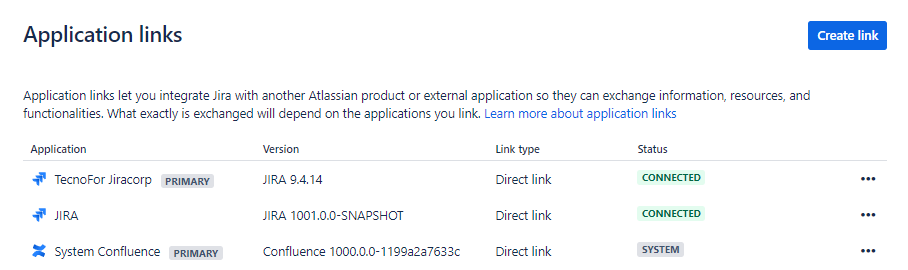
- Application Links: Facilitates inter-instance linking and issue integration, allowing Jira instances to work together even if they run different versions, enhancing interoperability.
- Unified Activity Streams: Provides a consolidated view of updates not only from the current instance but also from connected Jira or other Atlassian product instances, promoting real-time collaboration.
- Unified Reporting Dashboards: Enables the creation of Jira dashboards with gadgets drawing data from linked instances, offering a comprehensive reporting overview across all relevant instances.
- Remote Issue Links: Allows tracking dependencies and relations of issues not only within local projects but also with remote projects in other instances.
- Application Navigator: Simplifies navigation between Jira instances and other Atlassian products with a user-friendly header, eliminating the need to remember specific addresses.
- Jira Issue Copy (by Atlassian Labs): A tool for copying issues between Jira instances, providing a cleaner user interface, and supporting custom configurations. Note: This add-on is not officially supported by Atlassian.
- Federated Search: While not a native Jira feature, ALM’s Jira Client desktop application enables searching across multiple instances, automating queries across various systems for enhanced efficiency.

More info in this link: https://confluence.atlassian.com/adminjiraserver/federating-jira-managing-multiple-instances-961257360.html#FederatingJiramanagingmultipleinstances-access_new_features
In summary, Jira Federation unlocks a new era of collaboration, providing tailored solutions for managing multiple instances effectively.
Tags: #AtlassianCreator #JiraFederation #EnterpriseCollaboration #ProjectManagement
MrAddon by TecnoFor
.


 www.MrAddon.com ®: Jira & Confluence Administration Support Blog